This fix sounds bad but it's worth the trouble

If you have a huge collection of songs on iTunes or you spend a lot of time downloading music to your computer, it can be frustrating when they won’t all sync to your device.
You’ve probably even selected all the songs and dragged them to your device but nothing happens. Instead, the music sync may stick with messages like “waiting for changes to be applied” or “waiting to copy items”, or iTunes may freeze altogether.
Table of Contents

No matter how many times you try, you may discover iTunes not syncing your entire music library. If this is your experience, we’re going to show you different methods to use when iTunes won’t sync all your songs to your devices.
Why Is iTunes Not Syncing Music?
There are several issues that can prevent iTunes from syncing your entire music library such as:
- Outdated version of iTunes on your devices
- Improperly configured settings of iTunes Sync
- iPhone is unlocked or doesn’t trust your computer
- USB cable is damaged or improperly connected to your devices
- iTunes may not be able to locate some or all of your music
- Songs may be grouped into “unknown” category on your device
- iCloud Music Library is enabled in iPhone settings
How To Fix iTunes Not Syncing Music Library
- Ensure you have the latest iTunes software version.
- Check that the missing songs are actual songs and not miscellaneous files.
- Check your phone’s storage space.
- Quit iTunes and re-launch.
- Connect all devices to the internet.
- Turn on Sync Library for all devices.
- Turn off iTunes Match.
- Transfer music manually.
- Turn off iCloud Music and sync again.
- Reset network settings.
- Sync music to iPhone, iPad, iPod with the iTunes alternative tool.
- Set iTunes to sync your “Entire Music Library”:
- Update file paths for your music in iTunes.
- Get an iTunes alternative.
Quick Checks
Before trying any of the solutions we’ve listed below, go through this simple checklist:
- Keep iTunes updated by making sure you have the latest iTunes software version installed on your computer.
When you run iTunes, it automatically checks the version update, but you can force it to check for one by clicking Help > Check for Updates on your Windows computer, or if you’re using a Mac, click the menu tab in iTunes and select Check for Updates.
- Close the program once you have made sure it’s up-to-date.
- Check that the missing songs are actual songs and not miscellaneous files.
- Confirm that your phone has enough storage space.
- Quit iTunes and re-launch.
- Check that all your devices are connected to the internet.
- Visit Apple’s System Status page to check whether there are any service interruptions in your region or country.
Turn On Sync Library For All Devices
If you have the latest version of macOS, iOS, or iPadOS, Sync Library is turned on by default. If you turned it off, here’s how to turn it back on:
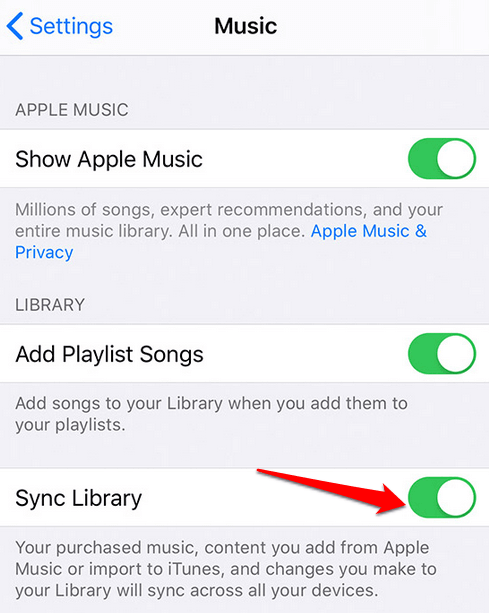
- On iOS devices, go to Settings > Music and then tap the Sync Library switch to toggle it to on/green. You won’t see the option if you don’t subscribe to iTunes Match or Apple Music. When Sync Library is off or is updating, a message will appear above the Library tab in the Apple Music app.
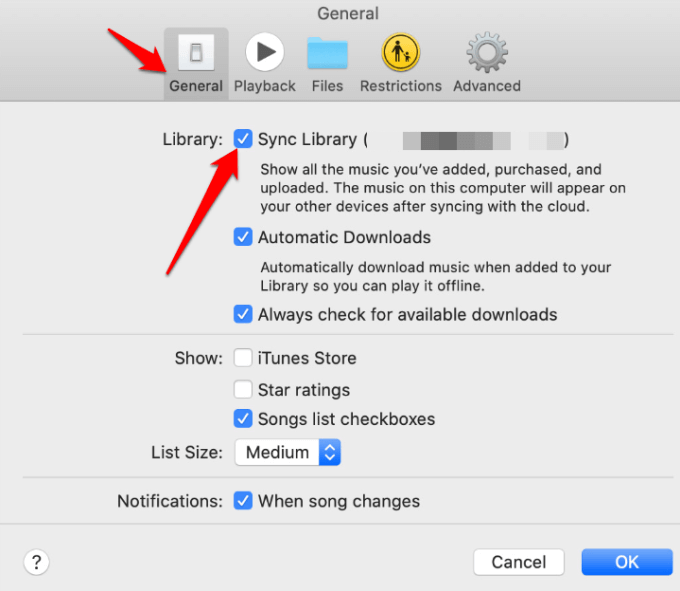
On a Mac computer, open Apple Music and go to the menu bar at the top. Select Music>Preferences and go to the General tab. From there, select Sync Library to turn it on and click OK.
Note: For large music libraries, the process may take some time to upload and sync across all devices.
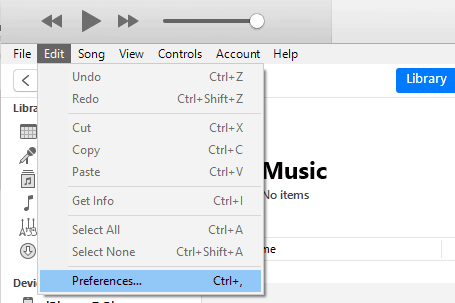
On Windows PCs, the iCloud Music Library isn’t on by default in iTunes for Windows. To turn it on, go to iTunes and click Edit > Preferences.
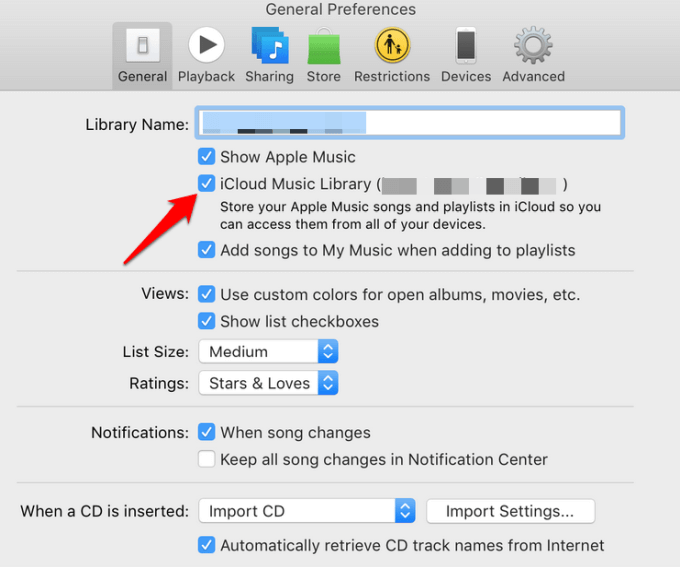
Click the General tab and click on iCloud Music Library to turn it on, and then click OK. If you’re not subscribed to iTunes Match or Apple Music, you won’t see an option to turn iCloud Music Library on.
Note: If you’re an Apple Music subscriber, you can access your music library on other devices that support the app, without activating Sync Library.
Turn off iTunes Match on iPhone
The iTunes Match service allows you to access your music library on any Windows PC with iTunes for Windows or any Apple device. If iTunes Match is turned on, iTunes won’t let you sync music, so you have to disable it first and then try syncing music normally again.
To do this, go to Settings > Music.
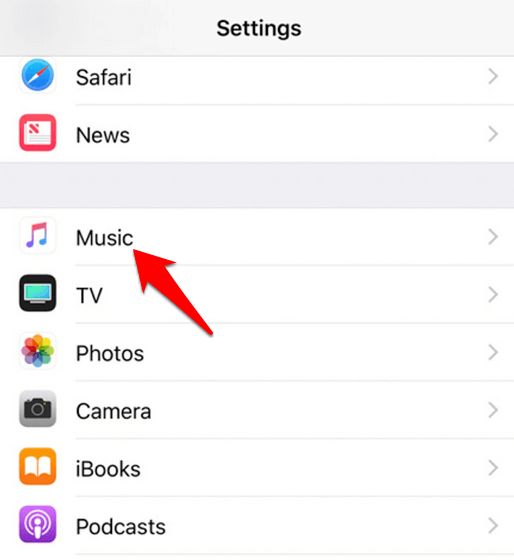
Click on iTunes & App Store. Turn off iTunes Match and try syncing your songs again. You can also re-authorize iTunes and your device to see if your music will be synced.
Transfer Music Manually
Transferring your music manually may help when you find iTunes not syncing songs from your entire music library. You can select and drop music onto your other device once you switch from iTunes sync mode to the manual transfer method.
To do this, open iTunes and go to the left pane. Under Library, click Songs and select Albums, Artists or Genres. Here, you can click through to find songs that match.
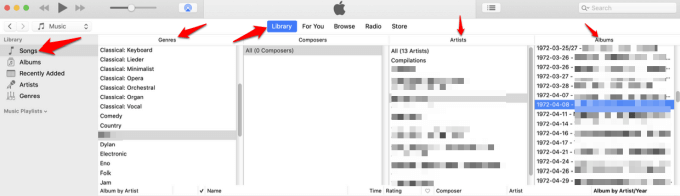
Drag and drop your songs from the main iTunes window to your other device under the Devices section. Hold down the CTRL key (or Command key for Mac) and select your songs so you can drag multiple songs in one go.
Alternatively, you can use iTunes playlists and then drag and drop them onto your device’s icon in the left pane. Creating and using playlists to sync your library will save you heaps of time when syncing.
Turn Off iCloud Music and Sync Again
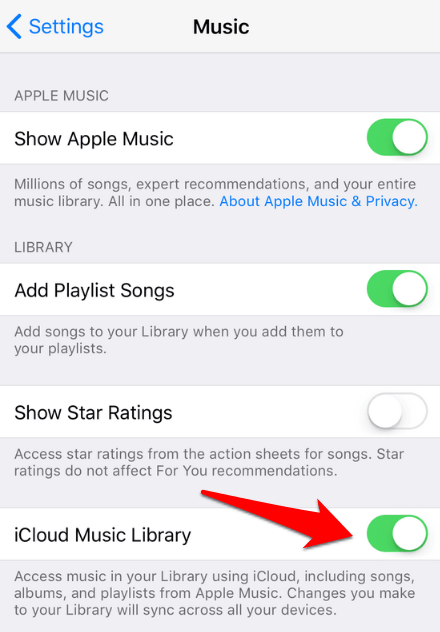
To turn off the iCloud Music Library, go to Settings>Music and turn off the iCloud Music Library on your iPhone.
Reset Network Settings
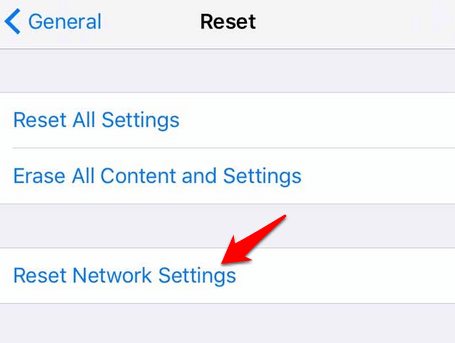
To do this, go to Settings>General>Reset and then click or tap Reset Network Settings on your iPhone.
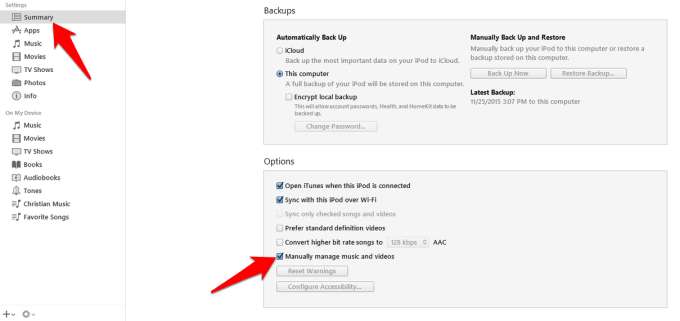
Connect your iPhone to your computer. If you see the “Trust this computer” popup, select it and then go to the iTunes Summary tab. Click Manually manage music and videos, and then try syncing your music library again.
Set iTunes To Sync Your “Entire Music Library”
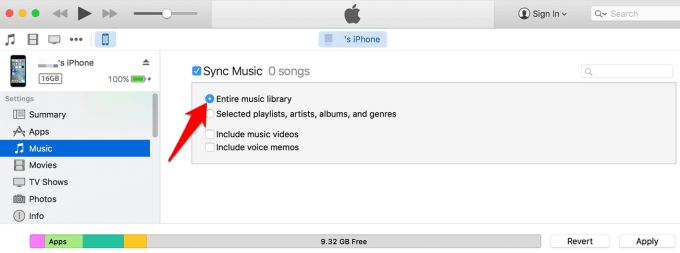
To do this, open iTunes and connect your iPhone or iPod to your computer, and select it in the iTunes sidebar. Click the Music tab and check Sync Music. Click Entire Music Library and try syncing the songs again.
Update File Paths For Your Music In iTunes
If iTunes can’t locate or identify some or all of your songs, it won’t sync your entire music library. To check this, go to your music library or open iTunes and view your song list.
Scroll down your list of songs and check for any that has an exclamation mark (!) in front of its name. If you see any such songs, iTunes can’t locate its actual file. iTunes may have known the songs’ location at one time, but for some reason, the files were either moved or deleted so it can no longer find them.
If you think those songs can still be found on your hard drive, update their file path in iTunes by selecting the song with the !, and then click Edit>Song Info in iTunes. Click Locate file in iTunes.
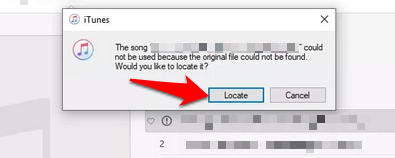
If you know the song’s location, point iTunes to it and see whether the song can play. If you don’t know the location, try using the Windows File Explorer that opened when you click Locate. Use the search bar at the top left side of the Explorer folder to find your songs.
Go to C: Drive or whichever drive has the missing songs, and search for them. You can type the title song as it appears in iTunes and once you find it, the “!” should go away and you can play the song in iTunes.
When iTunes identifies the songs, it’ll ask you whether you’d like to link the other songs in the same location to your music library. If you click Yes, it’ll catalog all missing tracks in a few minutes and you should see the “!” mark in front of the songs disappear.
For songs that are in different locations, repeat this process to find them. Once the songs are available, you can sync your entire music library with your device.
Sync Music To iPhone, iPad, iPod With iTunes Alternative Tool
If you find iTunes not syncing music even after trying the methods above, you can try an iTunes alternative tool to move your entire music library. The tool you choose should be compatible with your device for it to sync music from iTunes, move your songs from your device to a computer, and if possible, restores the iTunes library.
Alternatively, you can store music in the cloud, use the iTunes iOS app, a streaming music service like Spotify or YouTube Red, local media player like VLC, or an alternative library manager.