

As soon as you open your web browser, all your activity online can be (and is being) tracked. The sites you visit, the things you buy online, and the services you log into. Private browsing can help you keep that information to yourself.
Even if you think you don’t care, there can be many reasons for you to want to stay incognito. They aren’t always the obvious ones, like preventing other people from looking at your browsing history and learning what you do online. Maybe you’d like to stop sites like Facebook using that information to tailor their ads to you. Or don’t want to worry about logging out when using a public computer.
However, don’t think that as soon as you turn on private browsing mode it guarantees that you’re not being recorded. With the Safari private browsing feature, you can use Terminal to easily bring up all the sites you’ve visited.
Let’s have a look at how to do that and how to get rid of that information for good.
How To Activate Private Browsing In Safari
If you’ve never used Safari’s private browsing feature before, here’s how to enable it.
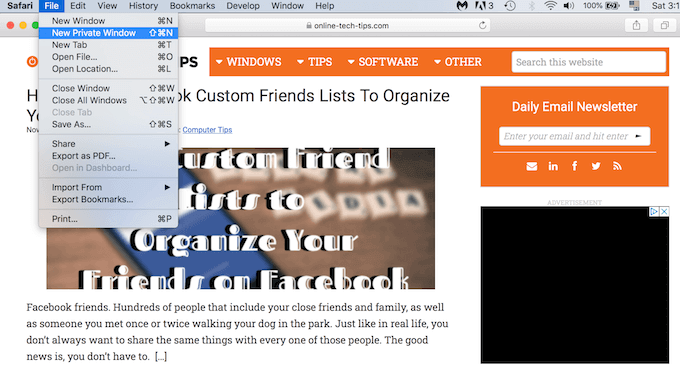
- Open the Safari browser.
- Choose File > New Private Window. You’ll notice that in the private window the address bar is darker.
- To open a new private tab, press Command + T. Any new tab that you open in this same window will also use private browsing.
If you’d like to set Safari private browsing as a default option, you can do it in settings.
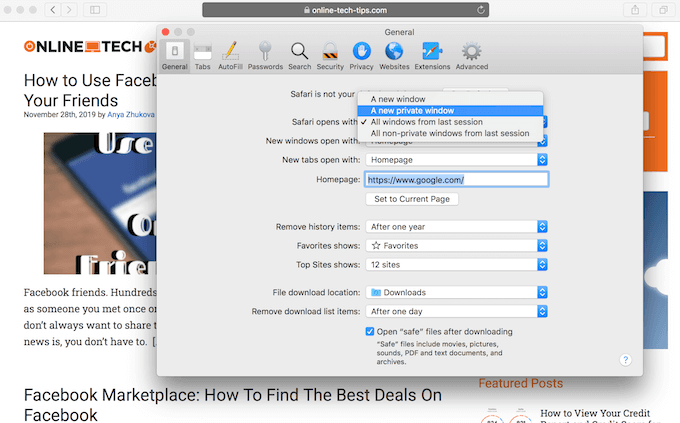
Go to Preferences and choose General. In the tab, find Safari opens with menu and click on A new private window.
What Safari Private Browsing Does & Doesn’t Do
Before you get to the practical side of things, it’s important to learn what private browsing means. As well as how exactly it protects your privacy when you use the Safari browser.
What Safari Private Browsing Feature Does
While this feature doesn’t offer complete privacy, private browsing does minimize the digital footprint you leave online.
Among the positive impacts of Safari private browsing are the following:
- Your browsing history can’t be found in Safari’s history tab.
- It doesn’t autofill usernames or passwords you’ve previously saved in the browser.
- It doesn’t save new passwords you enter into websites while browsing.
- Limits the annoying tracking cookies that some websites try and attach to you.
Things Private Browsing Doesn’t Hide
Of course, you shouldn’t trust Safari completely with your privacy. Simply because it has certain limitations. Some things that Safari’s private browsing feature doesn’t hide include:
- Bookmarks that you save in a private session are still visible when you browse the web with private browsing disabled.
- Your device’s IP address.
- If you’re using your work computer and it has monitoring software installed, then it will still see and record your online activity.
- Your Internet Service Provider can still see what you do online (and possibly sell that information).
Improve Your Privacy Using Terminal Commands
As we mentioned before, when you use Safari private browsing, the feature doesn’t store your search history in the history tab.
However, there’s a place on your computer where you can find it. It’s the Terminal.
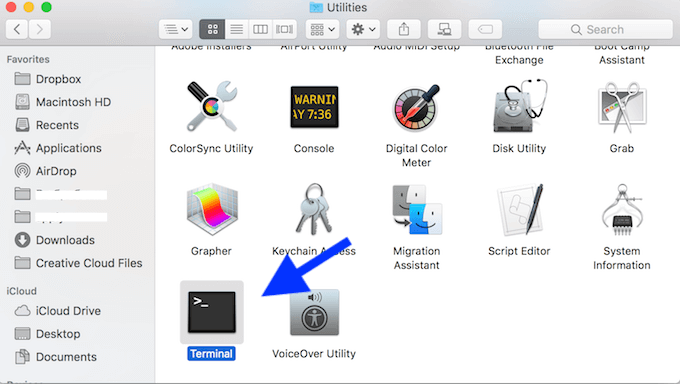
- To find Terminal, go to Applications and then to the Utilities folder on your computer.
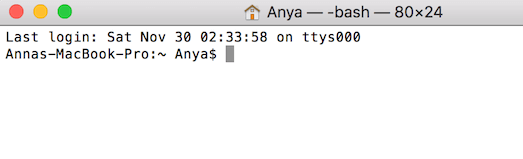
- Once you open Terminal, run this command to see the list of sites visited:
dscacheutil -cachedump -entries Host
If you get an error message like “Unable to get details from the cache node”, don’t worry about it and just skip down to the section below for clearing the cache. Otherwise, you’ll get a list of the domains of the websites you went to, looking like this:
Key: h_name :(website domain)ipv4 :1
However, there’s a way to delete that information.
Wipe Your Tracks Clean
Terminal has a command that lets you wipe those stored sites from your computer for good.
Open Terminal and enter the command:
dscacheutil -flushcache
This will pretty much “flush” all the stored information from Terminal. If you want to make sure those domains are gone, try and run dscacheutil -cachedump -entries Host command again. You’ll see a blank directory service cache this time.
Unfortunately, there’s no way to automate this. Meaning it won’t keep Terminal from saving the domains of the sites you go to in the future. So you’ll have to do this whole process regularly to keep your records clean.
Private Browsing In Other Browsers
Safari is considered to be a go-to browser for Mac users, as it comes pre-installed on your computer. But you might be using other alternative browsers as well as, or instead of, Safari.
Luckily, no matter which browser you choose, it will have its own private browsing feature. So you can learn how to stay incognito in Firefox, Chrome, Opera, or any other browser you use.
If you want to take things to the next level, it’s recommended to also use extra tools and extensions for better privacy online.