

Like all software, macOS isn’t immune to the occasional bug or problem. While it’s a rare occurrence, folders on macOS can occasionally change from appearing as regular folders to appearing as packages, like those used to install new macOS apps. This might also happen by design, especially if you’re creating new software.
Thankfully, it’s an easy process to restore a folder on a Mac, if you need to. There are a few ways to do this, but the easiest method is to use the Mac Terminal app. Here’s how to restore a folder on Mac, regardless of the format.
Restore a Folder on Mac Using The Terminal
The Mac Finder app tries to automatically detect what a file or folder’s true purpose is so that it knows how to handle it correctly. If the wrong attributes have been applied to the folder, then Finder will treat your folder as a package and won’t allow you to access the files held within.
It’ll also do this if your folder has the wrong extension, like .app. For these instructions to work, you’ll need the macOS Xcode Developer Tools installed, as the getfileinfo and setfile commands aren’t installed on macOS by default.
- To remove these attributes from macOS folders, open the Terminal app (Launchpad > Other > Terminal) and use the cd command to enter the directory containing your “broken” folder.
- The main cause of this problem is the has bundle attribute bit, so to check this, type getfileinfo -aB folder in the Terminal app, replacing the folder with the location of the folder you want to check. If the command returns a 1, this attribute has been applied to your folder, meaning it needs to be removed.
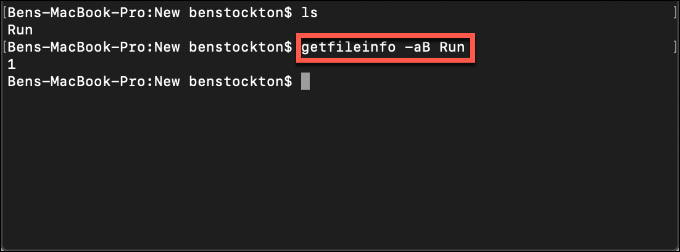
- To remove the has bundle attribute bit from your folder and restore access, type setfile -a b folder in the Terminal app, replacing folder with your folder location.
- Type getfileinfo -aB folder (replacing folder) to check the has bundle attribute status after this—if a 0 is returned, the attribute has been removed.
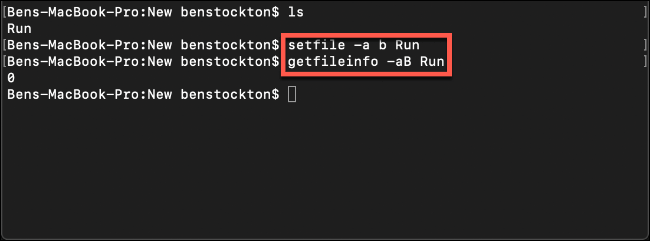
Once you’ve removed the has bundle attribute, attempt to access the folder in the Finder app, located as an icon on the Dock or in Launchpad. If you still can’t access the folder, check that your folder doesn’t have an unusual extension attached to it.
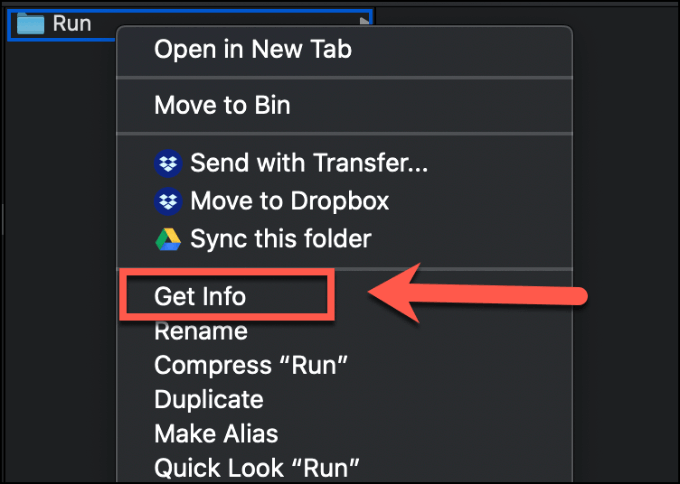
- Locate the folder in Finder, right-click and press Get Info to load your attribute information.
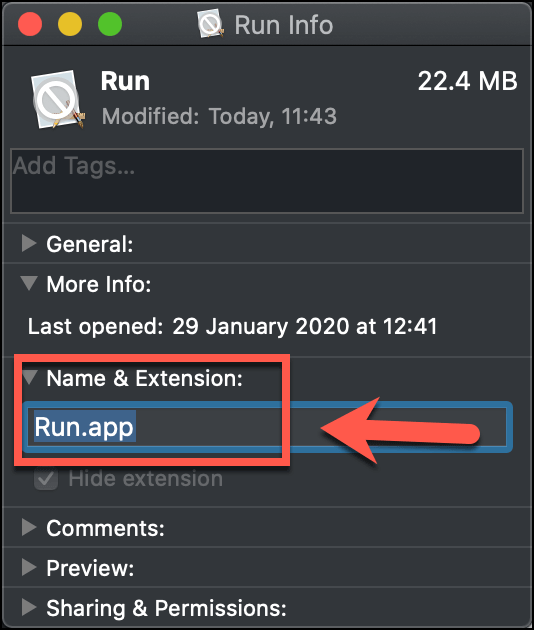
- This will load a separate window containing additional information on your folder. Click on the Name & Extension sub-category to see the “true” name for your folder. If it has a file extension (for instance, .app), remove it and hit enter on your keyboard to save.
- Finder will ask you to confirm whether you want to remove the extension from your folder. Click the Remove button to confirm.
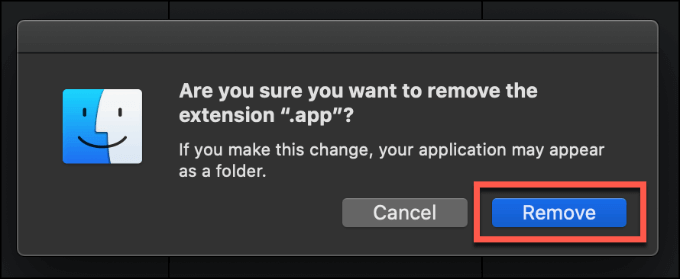
With the extension removed, your folder should return to normal in Finder, allowing you to open it as normal.
You may also want to access files and folders from a genuine macOS package (like a PKG or DMG file). If that’s the case, the easiest method is to extract the contents into a new folder.
Extracting Mac Folders Using The Terminal
A true macOS package comes in various file formats, including PKG and DMG files. How you approach restoring or extracting folders in these formats differ slightly. If you want to restore folders from genuine macOS package files, the Terminal app allows you to do this.
These methods assume that you’re attempting to access folders from packaged PKG or DMG files. If the files are corrupted (or aren’t true PKG or DMG files), then these instructions won’t work.
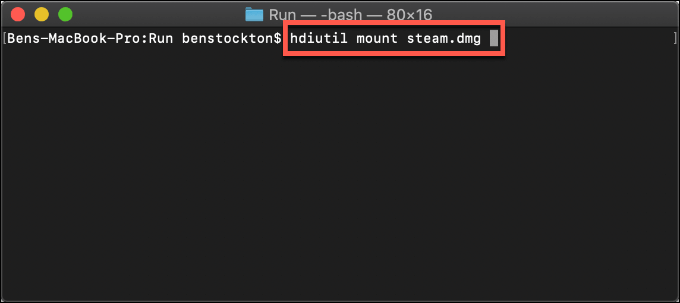
- If you want to restore folders from DMG files, you’ll need to mount it as a virtual drive first. You can do that by opening the Terminal from Launchpad > Other > Terminal.
- Type hdiutil attach file.dmg, replacing file.dmg with the location and filename of your DMG file, then press enter to run the command.
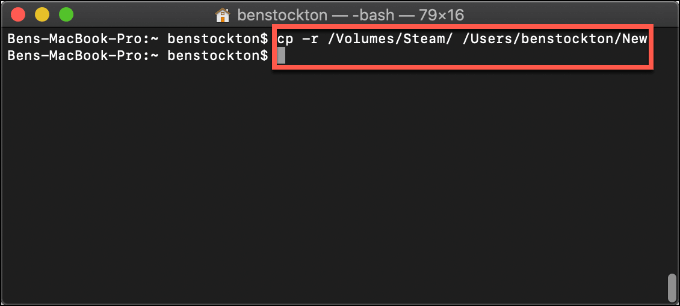
- Your DMG folder will be mounted as a folder under the Volumes directory on your macOS drive. To copy the contents of your DMG file to a new macOS folder, type cp -r /Volumes/File/ /Users/Username/Folder, replacing File with the original name of your DMG file, and replacing Username/Folder with the location to copy the files.
- Type hdiutil info to locate the drive identifier for your mounted DMG file, then type hdiutil detach /dev/drive to unmount your DMG file, replacing /dev/drive with the correct device identifier.
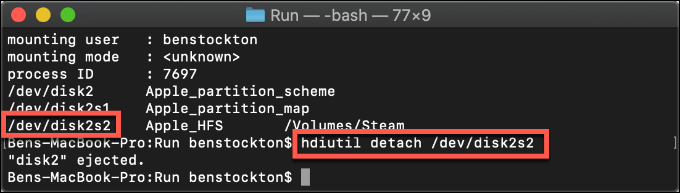
The contents of your DMG file will be restored to a new folder, ready for you to access.
- To extract files and folders from a PKG file to a standard macOS folder, open the Terminal app (Launchpad > Other > Terminal).
- From there, type pkgutil -expand /location/file.pkg newpkgfolder, replacing /location/file.pkg with the location and filename of your PKG file, and newpkgfolder with the correct extraction folder.
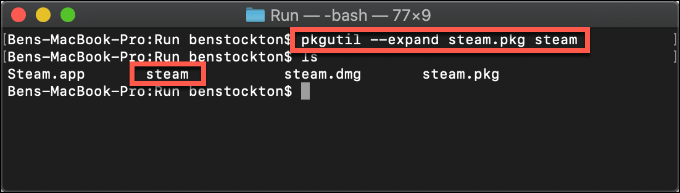
The contents of the PKG package file will be extracted to the location you specified.
Handling MacOS Files & Folders
If you don’t know how to restore a folder on Mac, try these methods first. In many cases, you can restore a broken macOS folder by fixing the extension or removing certain file attributes. If you have a genuine macOS package file in the PKG or DMG formats, you can extract the contents using the Terminal app.
Not every folder can be recovered, however. You should consider backing up your Mac with Time Machine to make sure you can always retrieve your files, even if a folder becomes corrupted or inaccessible in the future.